
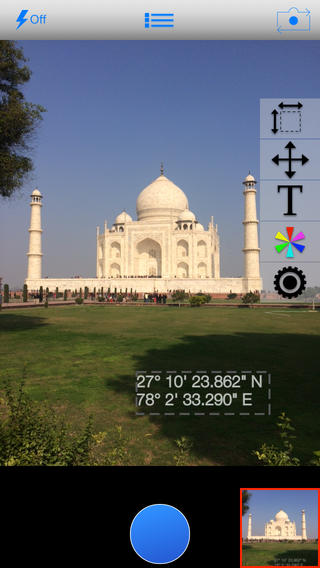
Albeit the camera on iOS devices is generally advanced and able to capture highly detailed photos (reaching up to 8MP in resolution on the newest iPhone 5S), they do have one drawback. This drawback lies in their inability to embed tags on the photos by default; such as date, time, address or GPS coordinates. Until now, this was possible only through post-editing of each photo, but thanks to a new app named TechCamera iPhone and iPad users can get to capture photos with embedded tags straight-on. Here is what the app has to offer in a glance:
Ability to include a Variety of Tags by Default
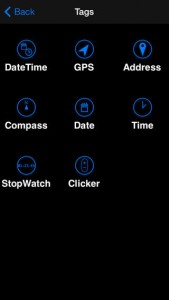
TechCamera can save photos using a variety of default tags, which can all be easily selected from the menu before capturing a snap. For instance, users can include time and date at which the photo was taken, information which will be visible in the bottom right corner. Additionally, anyone can enhance photos through GPS coordinates, address, compass and more. Even a stopwatch is available by default, enabling anyone to capture the time between photos (e.g. time between photo 1 and photo 2).
Clicker Functionality
iPhone and iPad users who want to capture photos automatically (and with tags) at a default time interval can rejoice from Clicker functionality, namely a button which can be used specifically for this purpose. Once a time has been set (e.g. 2 seconds, 3 seconds, etc.), the app will capture snaps automatically at these intervals until it is manually stopped.
Place the Tags Anywhere on The Photo
By default, tags are embedded on the bottom-right corner of photos. However, this can be easily modified from the settings. Tags can be rearranged and set anywhere on the photo so that they become more easily viewable for the user. All tags can be rearranged easily, phones and tablets with bigger resolutions benefiting from more space in this regard.
Add Any Tag without Post-Editing
When TechCamera is used, tags are added to the photo instantly when users press the “snap” button. Thus, absolutely no post-editing is required. However, in order to benefit from certain features such as location, address or compass, the device’s GPS must be turned on and usable. Additionally, the device must be certified for Compass use.
Resolution Limitations
TechCamera can save a full-resolution image by default when it comes to iPhone 5S or any iPad. However, due to hardware limitations, photos on iPhone 5 are saved in half-resolution and on iPhone 4S only at 720 x 960 pixels. This is done in order to improve functionality and usability, eliminating waiting times between a photo and another.
Summary
TechCamera is a highly capable Photo Improvement app, which enables users to capture photos with a variety of embedded tags. This app is suitable for real estate agents, journalists, hikers, sports’ enthusiasts and basically anyone who wants to extend the functionality of the default iPhone/iPad camera. The app can be purchased at a price of $1.99 through App Store.
Price: $1.99
Rating: 4/5



No Responses to “TechCamera: An iOS App Designed to Improve Photo Usability”