
For its seemingly simple name, Plans is actually one of those apps that actually have qualities that more than meets the eye. Its name even readily exudes its straightforwardness when it comes to aiding users every time they are organizing a specific event, may it be a vacation, a party, orjust about any type of occasion.
Oftentimes, a good dose of planning is you’ll ever need to take the time to do to finish projects and execute events seamlessly and perfectly. Of course, it wouldn’t be wise to not rely on what technology has to offer when it comes to doing so, right? With Plans, for instance, you will have a platform where you’ll have all the tools and data you’ll ever need to make the most out of your money and time while finishing your goal.
The app is divided into three main sections: Plan, Calendar, and Budget. Shifting between these views would promptly give you a good overview of how a particular event or project would go about. For example, if you’re planning to host a party, you need only to enter it as your main goal in the app’s interface.
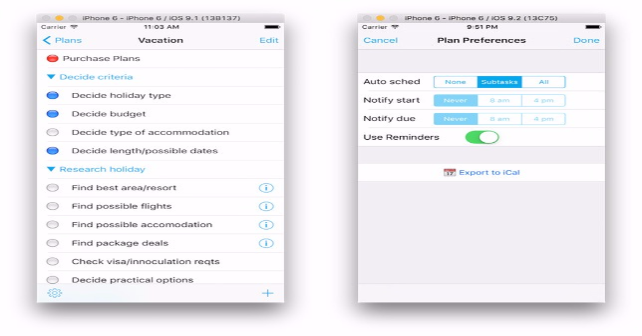
Afterwards, you can choose to decide to include specific criteria in your plan. As an example, there is a criteria called “Decide budget”. If you choose to include this, you then have to decide the span of time that you intend to perform that chosen task in the Calendar. The length of time, represented by colored bars and headed by dates, will be conveniently showed to you in the said section. In the Budget view, on the other hand, you can enter the amount of money that you have spent every single day, so you can always keep track of your project’s finances.
Other noteworthy features include auto-scheduling Tasks and Subtasks (if you have to reschedule them). There is also a built-in notification feature, which always keeps you in the know of the start of your tasks as well as its end. It also has support for your iPhone’s Reminders, as it can be readily integrated in it. You can also choose to export your completed plans to iCal.
There are arguably a lot of planning and management apps available in the App Store already, but Plans is made unique by its specialized features such as its ability to automatically adjust itself based on present needs and circumstances. There is also its ability to create numerous work streams; a feature that it could undoubtedly and proudly call its own. Incidentally, the app is basically free; however, its Pro plan unlocks the limit on the number of plans that the former has. For all of its features, though, Pro is definitely worth availing of.
Price: Free

-
Features of the App
-
Ease of Use
-
User Interface


No Responses to “Plans: An App That Greatly Complements Your iPhone’s Task Management Features”