
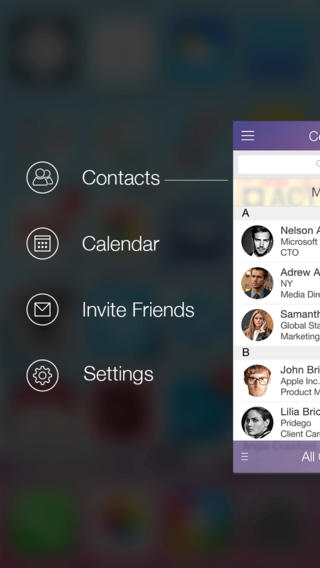
Belonging to the productivity niche, CardNet is an iPhone app that helps user create and share business cards in only a couple moments. A plus of this app over the other similar ones is the ability relies in its ability to share the created cards with contacts or “on air” with available devices. The app can easily list one’s name, address, phone number, email and more in an appealing format by using the OCR technology, whilst providing the ability for these cards to be stored on any iOS device for immediate access. Some other highlights of this app include:
Highly Intuitive Interface with Calendar Feature:
CardNet comes with a simple yet sleek interface, which showcases all the available functionalities right from the start. Once the app is installed and a new business card is created, user has the possibility to share it with contacts or other iOS users, invite new friends to download it or access the settings menu for extra tweaks. On top of these, the app benefits from a calendar feature, which enables users to schedule appointments with ease.
Access Information from Business Cards Immediately:
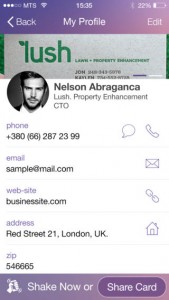
Once a new card is created or received, the iPhone user can immediately benefit from available information. For instance, one can use the phone number to text or call the desired person, send an email, access the person’s website and more. CardNet has the ability to store an infinite number of virtual business cards, so memory limitation will not pose anyone problems.
Share Business Cards in Various Ways:
Once a business card is created, users can easily share the available information via email or Bluetooth. The app connects seamlessly with the nearby iOS devices, so it’s only up to the user to select which persons get to receive the personal information. Moreover, the app allows one to exchange cards with any of the chosen phone contacts via synchronization, and there’s also a “shake now” feature for extra convenience. Using this feature, any iPhone user can share cards just by shaking the device to a certain degree.
Discover other CardNet Users in the Proximity:
Another great feature of the app relies in the ability to automatically discover any nearby iPhone or iPad user that owns the app. Thus, whenever a user needs to share his/her business card with a friend or business partner, the only thing required is a slight shake. When the action is recorded, one’s personal business card is automatically sent to the chosen receiver “on air”, hence granting total privacy and security.
CardNet can be downloaded free of charge from the App Store and can be installed on an unlimited number of iOS devices. The app comes with 5 free scans that allow one to share created business cards seamlessly, with more scans being purchasable within the app. The sleek interface and smooth functionality of the app make it highly recommended for anyone that has plenty of business to do but finds paper cards inconvenient to carry or share.
Price: Free
Rating: 4.5/5



No Responses to “CardNet: An Intuitive Business Card Creation App”