
Don’t panic if you have accidentally lost data and files from your iOS devices; you still have a good chance to recover them. Mobisaver iPhone Data Recovery Software for Mac retrieves files from additional storage like iTunes backups. This software supports the recovery of 12 types of files from iOS devices and iTunes backup – photos, messages, WhatsApp messages, contacts, Camera Roll, videos, notes, call history, calendars, reminders, bookmarks and message attachments.
Get started by installing the software on your Mac device and connect your smartphone to your Mac using a USB cable. Another important aspect of this recovery software is that data and files can be retrieved using two modes of restoration – from iOS devices and from iTunes backup. Media files such as videos, photos, WhatsApp messages, Camera Roll and bookmarks can be got back by using the iTunes backup option. Text files such as messages, message attachments, contacts, call history, calendars, reminders and notes can be recovered from iOS devices. The iTunes backup feature is the highlight of this software, as it is not commonly found in other data recovery applications.
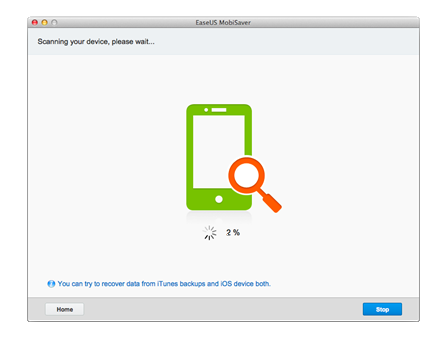
Once you choose the recovery mode, the software starts scanning your iPhone. The best feature of this software is that it has an option to get back media files in their original quality – you just have to hold down the power button and home button simultaneously for 10 seconds, and then hold down the home button for another 15 seconds to get this done.
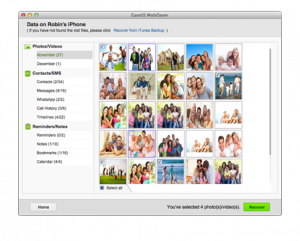
This software comes with a very intuitive interface which helps you get the job done quickly without any hassles. It arranges all the recoverable files in their respective categories. This enables users to restore only the files they require.
I tried recovering some files which I accidentally deleted from my iPhone device and iTunes backup, and the software did a splendid job in bringing back my files in the same quality. This software is available in both free and paid versions. With the free version you can recover only a limited number of files per day, but with the paid version you can recover any number of files. The premium version is available for $79.95.
Mobisaver iPhone Data Recovery Software does an excellent job in recovering your files and data in a short time.
Price: Free
Rating: 4/5
Download the software HERE for free!


No Responses to “Mobisaver iPhone Data Recovery Software for Mac – An Impressive & Credible Restoration Solution”